Please follow these instructions to optimize the speed of the screw driver.
Firstly the program for the specific screw needs to be setup in the dashboard, and the screw feeders position needs to be taught.
Teach the screw positions afterwards as in where the screws needs to be screwed in
The robot program that will screw the screws with standard speed, is shown as following:
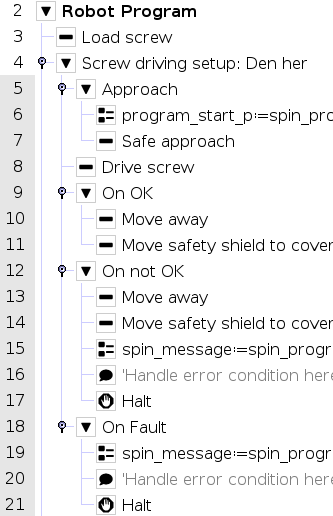
The program contains two different nodes and this needs to be done for every screw. First node is 'Load screw', second is 'Screw driving setup'
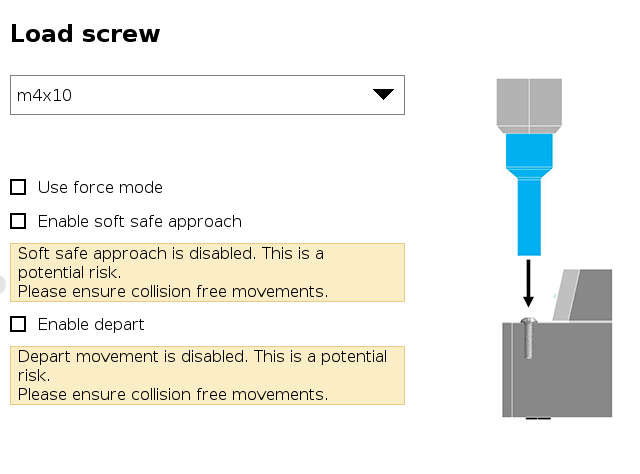
To optimize the speed you need to change some of the options within 'Load screw' and 'Drive screw' and add some waypoints to avoid collisions with e.g. the screw feeder and other things. Click on 'Load screw' and uncheck all of the boxes as shown.
Now you need to modify 'Screw driving setup'
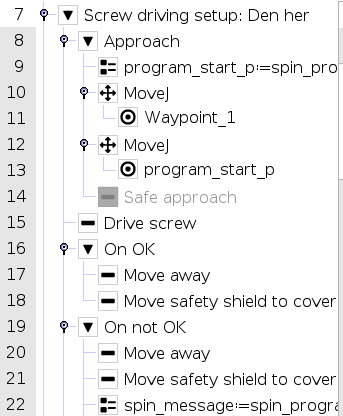
Put 'Safe approach' on Halt so it wont interfere when using the waypoints.
Waypoint_1 in node 11 is used to offset the screw tool from the screw feeder after the screw is loaded.
Insert another waypoint under waypoint_1 and change the waypoint to a variable position. Use the variable program_start_p.
Finally click on all the MoveJ nodes and change the speeds as shown.
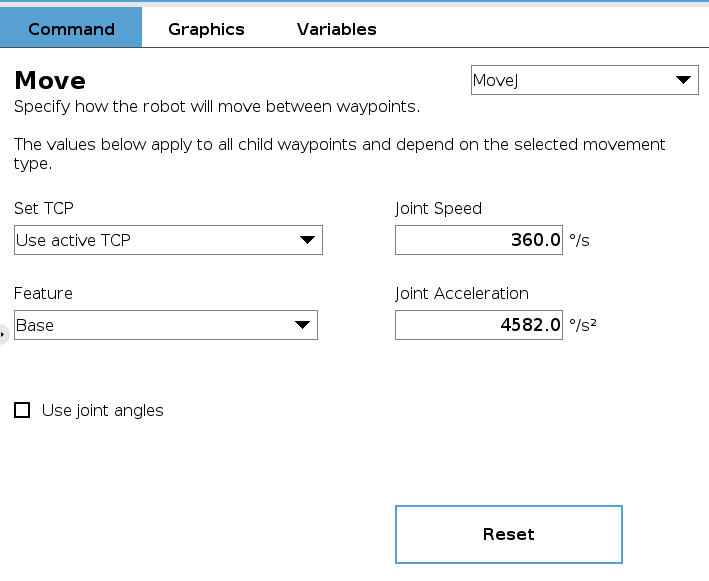 Joint speed and joint acceleration is set to maximum in this case.
Was this article helpful?
That’s Great!
Thank you for your feedback
Sorry! We couldn't be helpful
Thank you for your feedback
Feedback sent
We appreciate your effort and will try to fix the article